Audit log and activity
A trustworthy record of who did what and when: sign-ins, role changes, deletions and everyday changes to issues.
When something goes wrong, or someone simply asks “who changed this?”, the audit log has the answer. It records who did what, when, and, where it applies, why. Entries cannot be edited from within Barynt.
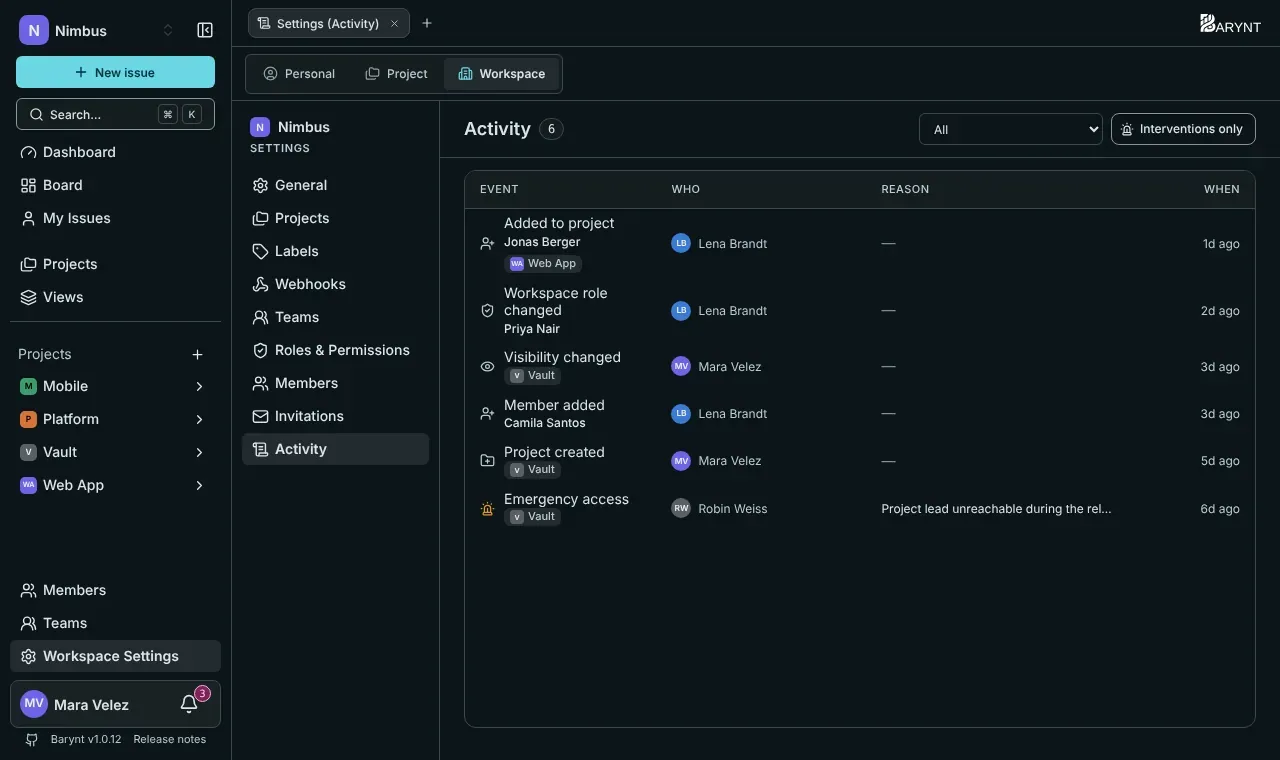
Where to find it
The same log is shown in four places, each with its own permission:
| Where | What it shows | Who sees it |
|---|---|---|
| Issue → Activity tab | The changes on that one issue. | Everyone who can see the issue. |
| Project settings → Activity | Everything that happened in the project. | Project admins. |
| Workspace settings → Activity | Everything in the workspace. | Owners, admins and managers. |
| Admin → Audit log | Server-wide events: sign-ins, platform roles, workspace suspensions. | Platform administrators. |
Every list has an Event filter and the switch Interventions only, which hides the everyday noise and keeps only the entries that matter for security.
What is recorded
The log is deliberately selective. It does not record every page view, because a log nobody reads protects nobody. It records what shifts permissions or destroys data, plus the everyday life of issues.
Interventions (the security-relevant events):
- Signed in, sign-in failed
- Role changed (platform, workspace, project)
- Account deactivated or reactivated
- Emergency access to a project (with the reason)
- Project deleted, archived or reassigned; workspace deleted or suspended
- Mail templates and system settings changed
Everyday events in workspaces and projects:
- Projects created, visibility changed
- Members added or removed
- Issues created, deleted, assigned, unassigned
- Title, description, status, priority, type, labels, due date, story points or time estimate changed
- Sub-issues, relations and attachments added or removed
- Comments added or removed
- Public links created or revoked
- Labels created or deleted, shared views deleted
For issue edits, the log tells you which aspect changed (“Status changed”), not the old and new text. That keeps it readable and keeps it from becoming a second copy of your content.
Reading an entry
Each entry shows the event, who did it, when and the reason, if one was given (for emergency access it is mandatory). A person’s name is saved with the entry at the time. If someone is renamed or leaves later, the old entries stay as they were written.
Good to know
- The log answers questions after the fact. For immediate notice of events, use webhooks.
- Platform administrators can see server-wide events but, by design, no issue content. See Platform administration.