Webhooks
Let Barynt tell other systems when something happens: a signed message to an address of your choice, the moment an issue, comment or shared view changes.
With a webhook, Barynt calls you. Whenever something you care about happens in the workspace, it sends a message to an address you choose. That is how you post new bugs into a chat channel, start a build when an issue moves to In Review, or keep another system up to date without checking again and again.
Examples of what teams do with it
- Chat notifications: a message in your team channel for every new Urgent bug.
- Automation: when an issue is created with the label
Customer, open a ticket in the support system. - Reporting: copy every change into a data warehouse.
- Syncing a spreadsheet, a status page or a customer portal.
Some of these need a developer, or a tool like Zapier, Make or n8n that can receive a webhook. The settings page itself needs no code.
Setting one up
Open Workspace settings → Webhooks (you need the permission to manage webhooks, which owners, admins and managers have) and click New webhook.
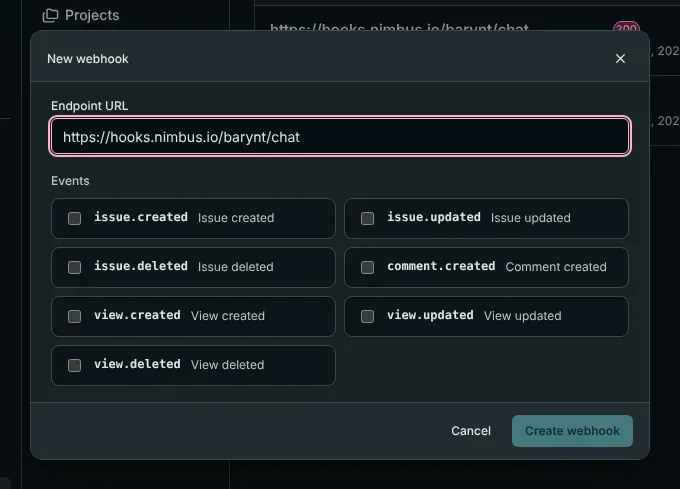
- Endpoint URL: the address that should receive the messages, for example
https://example.com/webhooks/barynt. It must start withhttps://orhttp://. Use HTTPS, because the messages carry the content of your issues. - Events: choose what you want to hear about. At least one.
- Click Create webhook. Barynt shows the secret once: copy it now. The receiver needs it to check that a message really came from your Barynt.
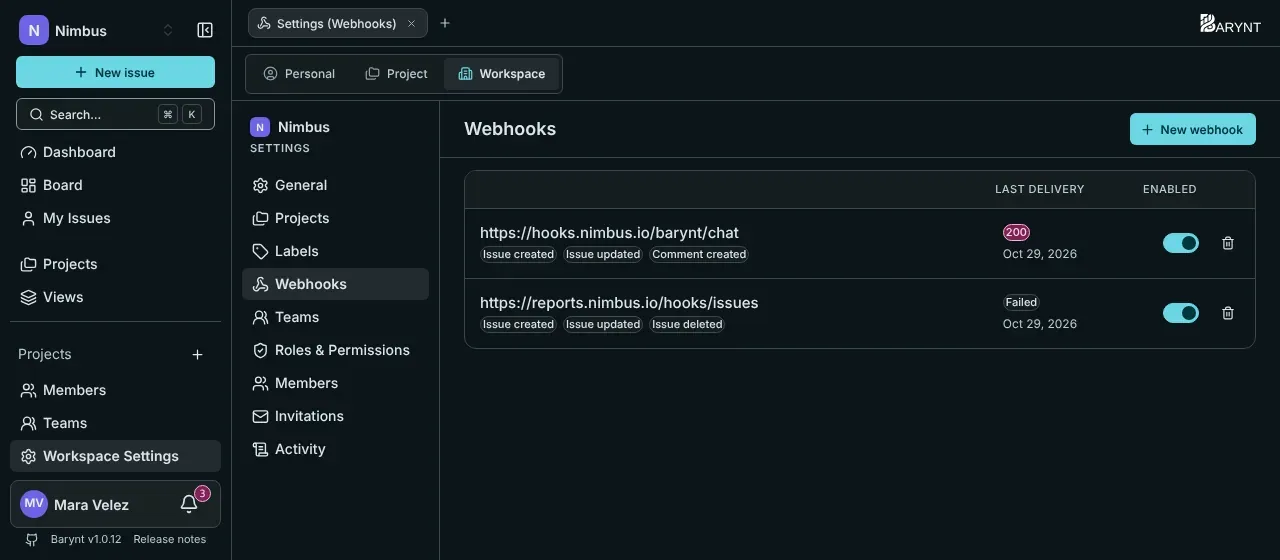
The list shows each webhook with the events it listens to, its last delivery (the HTTP status, or the error) and a switch to turn it on or off. A webhook that has never delivered anything says so (“Never delivered”). Deleting one stops it immediately.
A webhook’s address and events cannot be edited afterwards. To change them, create a new webhook and delete the old one. The same goes for a new secret, for example after it leaked: delete the webhook and create it again.
Webhooks belong to one workspace and only report events of that workspace. A project’s issues, comments and shared views all count, whoever changed them and wherever: in the app, through the REST API or by an AI assistant through MCP.
Events
| Event | When |
|---|---|
issue.created | An issue is created. |
issue.updated | An issue changes. The message carries the whole current issue, not just the difference. |
issue.deleted | An issue is deleted. The message is a short snapshot (id, reference, project, title). |
comment.created | A comment is written (also a reply). Editing or deleting a comment sends nothing. |
view.created, view.updated, view.deleted | A shared view changes. Private views never trigger anything. |
Every event with a complete example message is on the page Webhook events.
What a message looks like
Barynt sends an HTTP POST with these headers and a JSON body:
| Header | Content |
|---|---|
Content-Type | application/json |
X-Barynt-Timestamp | When the message was sent, in milliseconds since 1970. |
X-Barynt-Signature | The signature of the message, made with your secret. |
{ "event": "issue.created", "timestamp": 1772870400000, "data": { "id": "i_4k2n1x", "ref": "WEB-42", "title": "Fix broken checkout flow", "status": "backlog", "priority": 2, "type": "feature", "labels": [{ "id": "l_9f2a1b", "name": "frontend" }], "assignee": null, "reporter": { "id": "u_1a2b3c", "name": "Alex Kim" }, "project": { "id": "proj_9f8e7d", "name": "Website Relaunch" } }}event says what happened, timestamp when, and data carries the issue, comment or view in the same shape as in the REST API.
Checking that a message is genuine
Anybody who knows the receiving address could send fake messages to it. That is why every delivery is signed. The receiver computes the same signature and compares:
signature = hex( HMAC-SHA256( secret, timestamp + "." + rawBody ) )Use the raw body exactly as received, before any JSON parsing, and the X-Barynt-Timestamp header. The signature is hex-encoded, without a prefix. In Node.js:
import { createHmac, timingSafeEqual } from "node:crypto";
function isGenuine(secret, timestamp, rawBody, signature) {  const expected = createHmac("sha256", secret)    .update(`${timestamp}.${rawBody}`) // timestamp, a dot, the raw body    .digest("hex");  const a = Buffer.from(expected);  const b = Buffer.from(signature);  return a.length === b.length && timingSafeEqual(a, b);}
In Python:
import hmac, hashlib
def is_genuine(secret: str, timestamp: str, raw_body: bytes, signature: str) -> bool:    expected = hmac.new(secret.encode(), f"{timestamp}.".encode() + raw_body, hashlib.sha256).hexdigest()    return hmac.compare_digest(expected, signature)
Also reject messages whose timestamp is older than a few minutes (say five). That stops someone replaying an old message: because the timestamp is part of what is signed, they cannot simply change it.
A complete little receiver, with Express:
import express from "express";
const app = express();app.post("/webhooks/barynt", express.raw({ type: "application/json" }), (req, res) => {  const timestamp = req.get("X-Barynt-Timestamp");  const signature = req.get("X-Barynt-Signature");  const fresh = Math.abs(Date.now() - Number(timestamp)) < 5 * 60 * 1000;  if (!fresh || !isGenuine(process.env.BARYNT_WEBHOOK_SECRET, timestamp, req.body.toString(), signature)) {    return res.sendStatus(401);  }  const { event, data } = JSON.parse(req.body);  console.log(event, data.ref ?? data.id);  res.sendStatus(204); // answer quickly, do the slow work afterwards});app.listen(3000);
Delivery: what to expect
- One attempt only. Barynt sends each message once, waits ten seconds for an answer and does not retry. Any answer counts as delivered, whatever its status; Barynt only records the status. If your receiver is down or too slow, it misses that message. Receivers should answer quickly with a
2xxand do slow work afterwards. - The last result is shown in the webhook’s list: the HTTP status of the last attempt, or the error (for example a timeout or a refused connection). Only the last attempt is kept, there is no delivery history.
- No order guarantee. Two quick changes can arrive in either order. Use the time in the data (for an issue,
updated) to tell which is newer, and treattimestampas the time of sending. - At most once, not exactly once. A message is not sent twice, but one can be lost. For things that must not be missed, reconcile now and then through the REST API (for example once a night).
- Your server must be reachable from the Barynt server. A receiver on your laptop is not, unless you use a tunnelling tool such as ngrok while testing. When Barynt runs inside your company network, so must the receiver, or be reachable from there.
Trying it out
- Create a temporary receiver address at a service such as webhook.site, or run the Express example above behind a tunnel.
- Create a webhook for that address with all events.
- Create or change an issue in Barynt. The message arrives within a second.
- Look at the last delivery in the list:
200or204means it was received.
When nothing arrives
| What you see | Likely cause |
|---|---|
| “Never delivered” | Nothing has happened yet that the webhook listens to, or it is turned off, or it belongs to another workspace. |
An error such as fetch failed or The operation was aborted | The receiver was not reachable or took longer than ten seconds. Check the address, the firewall and TLS certificates. |
A status of 4xx/5xx | The receiver was reached but rejected the message. Look at its log: most often the signature check, because the body was changed before checking. |
| Signatures never match | The body was parsed and re-serialised before checking, the wrong secret was used, or the timestamp was left out of the signed string. |
More in Troubleshooting.
Good to know
- A message carries the content of the issue, such as its title and description. Treat the receiving address with care and use HTTPS.
- The secret is shown once and stored so Barynt can sign each message. Keep it in the receiver’s configuration, not in code that is shared.